RustFS now supports deployment on Kubernetes clusters via a Helm Chart. To simplify the usage of the Helm Chart, we have published the RustFS Helm Chart on Artifacthub.
RustFS Helm Chart Search
Search for rustfs on Artifacthub, and you will see three results:
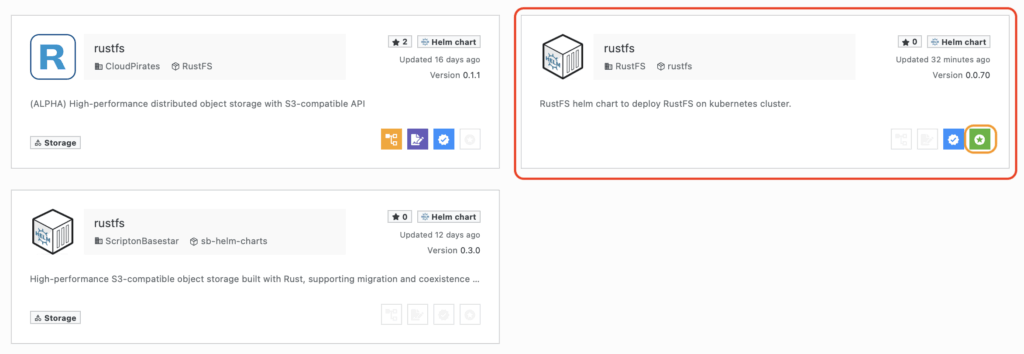
Select the Helm Chart marked Official. This is the Helm Chart officially published by RustFS, while the other two are published by community contributors.
You can read the README to learn more details about the RustFS Helm Chart.
Using the RustFS Helm Chart
Click the INSTALL button on the right side of Artifacthub to see the instructions for using the RustFS Helm Chart, which are divided into two steps:
- Add the repo:
helm repo add rustfs https://charts.rustfs.com
- Install the chart:
helm install my-rustfs rustfs/rustfs
If you want to install a specific version, you can first list all available versions:
# Update repo
helm repo update

# List versions
helm search repo rustfs --versions
NAME         	CHART VERSION	APP VERSION   	DESCRIPTION
rustfs/rustfs	0.0.70       	1.0.0-alpha.70	RustFS helm chart to deploy RustFS on kubernete...
rustfs/rustfs	0.0.69       	1.0.0-alpha.69	RustFS helm chart to deploy RustFS on kubernete...
rustfs/rustfs	0.0.68       	1.0.0-alpha.68	RustFS helm chart to deploy RustFS on kubernete...
Then you can specify a version using --version, for example:
helm install rustfs rustfs/rustfs --version 0.0.70
Installation Verification
You can check the status of RustFS pods:
kubectl -n rustfs get pods -w
NAME       READY   STATUS    RESTARTS        AGE
rustfs-0   1/1     Running   0               2m27s
rustfs-1   1/1     Running   0               2m27s
rustfs-2   1/1     Running   0               2m27s
rustfs-3   1/1     Running   0               2m27s
Check the Ingress:
kubectl -n rustfs get ing
NAME     CLASS   HOSTS            ADDRESS         PORTS     AGE
rustfs   nginx   your.rustfs.com   10.43.237.152   80, 443   29m
Open https://your.rustfs.com in your browser and log in to the RustFS instance using the default username and password: rustfsadmin.
Feedback
If you encounter any issues during use, feel free to submit them via Issues on RustFS Helm Chart repository .